Installation instructions will come once the R package is finalized.
Set Up
Necessary Files
Key Files
If you wish to subset environmental covariates used in the models when making the data frames, you will need files that 1) list the species and their habitat and feeding guilds and 2) define the covariates to keep for each feeding and habitat guild, referred to as key files.
The species list should at least include a column with the species name and then columns for the associated feeding and habitat guild. While it is not necessary, this file is also a good place to list alternative species names (common names, scientific names, any variations on either) that can be used to make sure that observations of the same species are combined across data types.
Key files should have seperate columns, for each feeding and habitat guild with names that match the different feeding and habitat guilds in the species list. The entries in each column should be a column name associated with that guild.
It is critical that the column names in the key files and the different habitat/feeding guild names in the species key are identical (remember: ‘Pelagic’ and ‘Pelagic’ are technically two different character strings in R) or else they will not be matched correctly.
Fisheries Data
This workflow is designed to accept both fisheries independent and dependent data sources. Data standardization functions have the ability to pull NEFSC survey (using survdat) and observer data using ROracle, but can also accept CSV files. CSV files will need records of all efforts, regardless of if the target species is collected or not, to correctly document absences and have a time column that can be converted with the POSIXct function.
Environmental Data
Functions are provided to pull hindcast or forecast data from MOM6 models via the CEFI portal. Other environmental data can be supplied, but should be on regular grids and are ideally netcdf files that can be read using raster if fisheries presence/absence rasters are desired on the same grid.
Directory
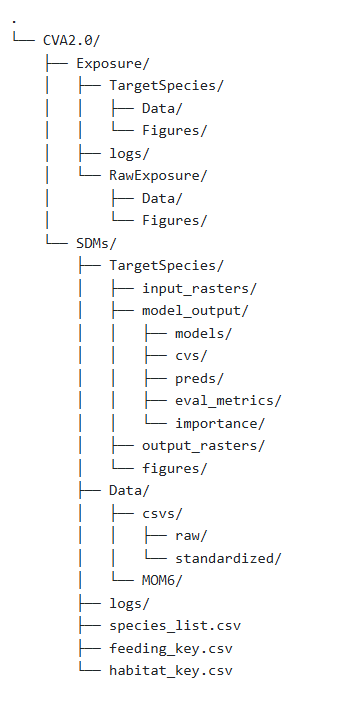
This R package is designed to work within a single working directory with folders for the Exposure and SDM results. To use the wrapper functions provided, the working directory should include a folder for each target species, a Data folder, and a logs folder. Key files can be added to the SDM working directory.
Within the SDM directory, the Data subdirectory should have subfolders for csv and MOM6 (or other environmental) data, as well as an object containing a list of static environmental covariates (bathymetry, distance to shore, etc). The CSV folder should contain raw and standardized subfolders to hold the raw csv files from different data sources, and their standardized counterparts from the standardize_data function. The MOM6 data should contain the raw, averaged, standard deviation, and normalized outputs from the MOM6 functions. Each species folder should contain three subfolders: 1) input_rasters, 2) model_output, and 3) output_rasters. The input_rasters folder contains all the individual rasters from each data source and the combined raster. The output_rasters folder contains all the predicted rasters from each model and the final ensemble model. The model_output folder contains the following folders: 1) models, 2) cvs, 3) preds, 4) eval_metrics, and 5) importance. Each of these folders will contain the output from their respective functions for each model component, and as necessary, the ensemble model.
The Exposure directory has a similar structure to the SDM directory, where each species specific folder contains seperate folders for Data and Figures. It is recommended that you use seperate subfolders within each of these if you are calculating exposure across multiple time frames to keep them seperate. The RawExposure folder contains the raw and ranked exposure data and figures.